
The first grant feels like a finish line. After months of writing and waiting, the award letter lands and the money hits the account. The work is funded. Time to run the program.
But a grant isn’t really your money — it’s the funder’s money, handed to you to spend on their behalf. It’s a little like a babysitter given grocery cash for the kids’ dinner: you’re trusted to spend it, but you’d better be able to show what you bought. That “show what you bought” part is grant tracking, and it’s where small nonprofits most often get caught short. This guide covers grant tracking in QuickBooks for nonprofits — what small organizations miss, which QuickBooks tools actually do the job, and how clean tracking pays off the next time you apply.
Key Takeaways
When a nonprofit has exactly one grant, tracking it feels optional. “We know what it’s for, we know roughly what we’ve spent — we’ll sort the details out when the report is due.” The logic seems fine. It isn’t.
Three things stack up at a small organization. The ED or founder is heads-down running the program, not thinking about account structure. The books are often kept by a volunteer or part-time bookkeeper who may not know how to separate a restricted grant from general operating money. And the problem stays invisible — right up until a funder asks for a report, an auditor asks for support, or the next application asks for a budget-versus-actual you can’t produce.
That’s the trap: grant tracking problems don’t hurt when they’re created. They hurt months later, all at once, usually under a deadline. (If a volunteer is carrying your books today, our piece on when a nonprofit outgrows a volunteer treasurer is a useful companion.)
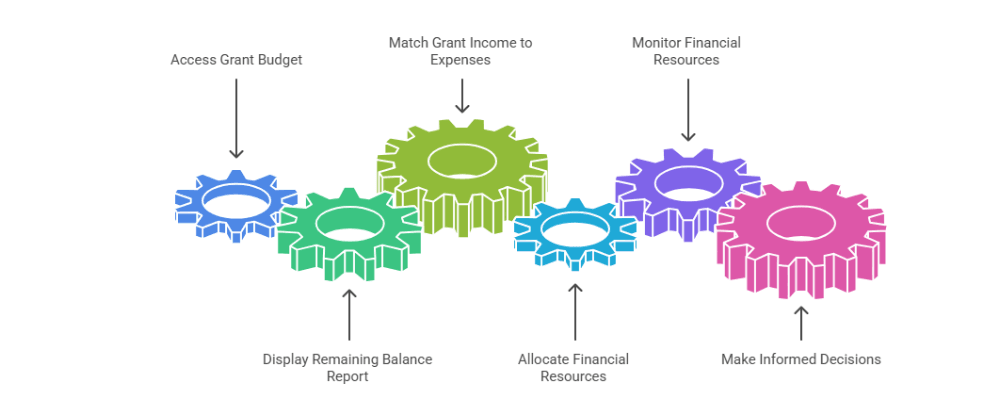
Here’s a simple test. If grant tracking is working, the ED should be able to answer these six questions in minutes — not after a weekend of rebuilding spreadsheets:
How much was awarded?
How much have we actually received?
How much have we spent?
Which specific expenses are tied to this grant?
What is the remaining balance?
Are we spending in line with the grant’s budget and restrictions?
If any of those takes more than a few clicks, the tracking structure — not your effort — is the thing that needs fixing.
When grant activity isn’t separated cleanly, the failures are predictable — and they compound:
The root cause is almost always the same: the difference between restricted and unrestricted funds was never built into the books. Fix that, and most of the list above disappears.
Good grant tracking in QuickBooks comes down to using the right dimension for the job and keeping it consistent — QuickBooks Online can track grants well when you do. The foundation is a clean, nonprofit chart of accounts; the tools below sit on top of it. Here’s what actually works, and the important fine print on each:
Class tracking
The workhorse for fund and grant tracking — tag every income and expense line to a grant or fund, then run a report by class to see the full picture. Fine print: class tracking is only available on QuickBooks Online Plus and Advanced, not Simple Start or Essentials.
Projects
Good for treating a single grant as a self-contained “project,” pulling its income, expenses, and profitability into one view — handy for time-bound or reimbursement grants.
Customers / sub-customers
Some organizations track each grantor as a customer and each grant as a sub-customer. It works, but can get tangled if you also use Projects — pick one primary method and stay consistent.
Location tracking
A second dimension (also Plus and Advanced) useful if you track by site or program in addition to grant — not a substitute for class.
Custom fields (not Tags)
Important: Intuit discontinued the QuickBooks Online Tags feature in 2025 and replaced it with enhanced custom fields. If an old guide tells you to track grants with Tags, it’s out of date — use class tracking as your primary method.
Whichever tools you choose, two rules hold: keep receipts and grant documents attached or filed alongside the entries — the IRS expects exempt organizations to document the sources of their receipts and expenditures — and don’t confuse three different things — a program (what you do), a grant (who funded it), and a restriction (how the money may be used). One grant can fund part of one program; one program can draw on several grants. Your structure has to keep them distinct.
Setting up grant tracking from scratch — or untangling a year of mixed-up entries? GivingArc builds clean grant structures in QuickBooks so your reports reconcile and your board sees real numbers.
Explore our bookkeeping & setup help →The same organization, the same grant — two very different experiences depending on how the books are set up:
When tracking is clean
When tracking is messy
This is the part worth slowing down for. Grant tracking isn’t just about satisfying the grant you have — it shapes how you show up for the grants you want next.
When your books are clean, you can demonstrate the kind of responsible stewardship that sits at the heart of a board’s financial oversight role — presenting clear program-cost history, handing over budget-versus-actual figures on request, and answering a funder’s financial questions with confidence instead of caveats. You become, on paper, the kind of organization that can be trusted with more.
Clean grant tracking doesn’t guarantee future funding. But it lets you present clearer, more credible financials when you apply — and credibility is something funders remember.
Most of these overlap with the broader nonprofit bookkeeping mistakes we see most often — and like those, they’re far cheaper to avoid than to unwind.
Plenty of nonprofits track grants themselves. But a few moments are worth bringing in nonprofit-specialized help — ideally before the books get messy, not after:
If you’re just setting up, our first 90 days of nonprofit bookkeeping guide and our bookkeeping best practices will help you start grants on the right footing — and clean books make board financial reports far easier to read.
If your nonprofit is receiving grants or preparing to apply, you don’t have to set up grant tracking in QuickBooks alone. GivingArc handles QuickBooks setup and cleanup, grant and restricted-fund tracking structures, monthly bookkeeping, board-ready reports, and Form 990- and audit-ready records — so your reporting is clear, your board understands the numbers, and your next grant report isn’t a cleanup project.
Make grant reporting a print-out, not a project
From QuickBooks setup & grant tracking to Form 990 support, GivingArc helps grant-funded 501(c)(3)s keep clean, fundable books.
Common questions from small nonprofits tracking grants in QuickBooks.
The most reliable method is class tracking: create a class for each grant or fund, then tag every related income and expense to it, so a report by class shows awarded, received, spent, and remaining amounts. Build it on a clean nonprofit chart of accounts, attach supporting documents to transactions, and keep grant, program, and restriction distinct.
Class tracking is the most common method for ongoing fund and grant tracking across the whole organization. Projects can be ideal for a single, self-contained grant — especially time-bound or reimbursement grants — where you want income, expenses, and balance in one view. The key is to pick one primary method and apply it consistently rather than mixing both for the same grant.
Not with class tracking, which is only available on QuickBooks Online Plus and Advanced. On lower tiers you can approximate grant tracking using customers or sub-customers, but most grant-funded nonprofits find it worth upgrading to Plus for proper class-based fund tracking and the reports funders expect.
Intuit discontinued the QuickBooks Online Tags feature in 2025, replacing it with enhanced custom fields. Historical tag data remains viewable for a limited transition period, but Tags should no longer be used as a grant tracking method. Use class tracking as your primary tool, with custom fields for any extra grant details you want to record.
Clean tracking lets you show responsible stewardship, present clear program-cost history and budget-versus-actual figures, and answer funders’ financial questions with confidence. It does not guarantee funding, but it helps your nonprofit present clearer, more credible financial information when applying — and reduces the cleanup that messy books force before each new application.
Consider help when you receive your first major or restricted grant, start juggling multiple grants, take on a reimbursement grant with confusing cash flow, need board-ready reports your books can’t produce, face a grantor’s detailed reporting requirement, or already sense the books are messy. Getting the structure right early is far cheaper than cleaning it up later.
GivingArc provides bookkeeping, Form 990 preparation, and nonprofit-specialized accounting for small and mid-size 501(c)(3) organizations across the US. This article is general information, not tax, legal, or software advice. Reviewed by Min Kim, CPA.