
Key Takeaways
If you run a small nonprofit, you’ve probably heard of TechSoup. Maybe a board member mentioned it. Maybe you stumbled on a forum post saying you can get Adobe Creative Cloud for almost nothing. Maybe you registered, got verified, and then never went back — because the catalog felt overwhelming and the “admin fees” looked confusing.
This is the guide we wished existed when we first started looking into it. If you’re also looking at hidden software costs more broadly, our companion piece on the hidden cost of “free” fundraising software covers the other side of the same coin.
The thesis up front: TechSoup isn’t a discount store. It’s a guest list — and the admin fee is the cover charge that gets you into a room where nonprofit pricing actually exists. Microsoft, Adobe, Intuit, and Cisco have agreed to give nonprofits steep discounts (or free licenses), but most of those prices aren’t on the public menu. TechSoup runs the door. The admin fee is what you pay to walk in.
Once you see TechSoup that way, two questions get clearer:
Below: how to register, how to read the pricing, what to buy, and the Microsoft change in 2025 that quietly reshaped many nonprofit IT budgets.
TechSoup Global is a 501(c)(3) nonprofit that has spent 30+ years brokering technology donations and discounts for other nonprofits. It runs registration, eligibility verification, and license fulfillment for participating vendors.
What it is:
What it isn’t:
The mental model that helps: TechSoup runs the door. The admin fee is the cover charge. Once you’re in, the prices Adobe, Intuit, and Microsoft have already agreed to for nonprofits are on the menu — but only if you came in through the right door.
The 6-minute video below walks through the entire registration and first-purchase flow on real TechSoup screens. If you’re already verified, skip ahead.
For US nonprofits, eligibility is narrower than “any 501(c)(3).” You need:
The verification flow itself is straightforward:
Two status terms confuse people. “Validated” means TechSoup has verified your organization as a legitimate nonprofit. “Eligible” means a specific vendor has approved you for their program. You need both.
This is where TechSoup justifies its existence. A few categories deliver savings that are hard to beat anywhere — particularly the Adobe nonprofit program and the Intuit QuickBooks Online for Nonprofits deal.

Adobe
Creative Cloud for Nonprofits
60% off Y1
40% off Y2+
retail subscription
~$700/yr saved (2-designer team)
Admin fee paid to TechSoup, then discounted Adobe subscription continues annually.
Intuit
QuickBooks Online Plus
$80/year
$1,680/year retail
~95% off · 5 users included
Often pays for an entire year of TechSoup admin fees on its own.
Intuit
QuickBooks Online Advanced
$170/year
$4,080/year retail
~96% off · 25 users included
Best fit for nonprofits with multiple bookkeepers or program managers in the books.
Cisco / Dell / Lenovo
Hardware
Heavy discounts
refurbished & current-gen
Catalog rotates — check before buying
Laptops, desktops, networking gear. Don’t browse for inspiration; buy when you have a specific need.
Foxit
PDF Editor
~$50–80/yr
60–90% off retail
Solid Acrobat alternative
Right fit for 5–10 person staff that doesn’t need full Acrobat.
Intuit (legacy)
QuickBooks Desktop
$20/year admin fee
legacy users only
Keeps Pro/Premier alive
Useful for bookkeepers who can’t or won’t migrate to Online.

Think of every product as having a cover charge (the admin fee, paid to TechSoup) and a tab (the vendor cost, paid to Adobe, Intuit, etc., if any). Some products are donations — you only pay the cover. Others are discounted — you pay both.
The simple rule we give CPA clients: calculate one full year of total cost (cover + tab), then compare to the cheapest direct nonprofit alternative.
Worked Example #1
QuickBooks Online Plus (5 users)
Easy yes. The cover pays for itself before the first board meeting.
Worked Example #2
Single Zoom Pro license
Depends. Worth it if you actually drink at this bar — many small nonprofits live on free Zoom.
The trap to avoid: buying through TechSoup just because it’s TechSoup, without checking the direct nonprofit price. Most major vendors (Microsoft, Google, Zoom, Slack, Asana) run their own nonprofit programs — sometimes better, sometimes worse than TechSoup. TechSoup wins big on Adobe, Intuit, and certain hardware. It’s neutral or slightly worse on a handful of single-seat SaaS where the admin fee approaches the discounted annual cost.
We’ll cover when to skip TechSoup entirely in the next post in this series.
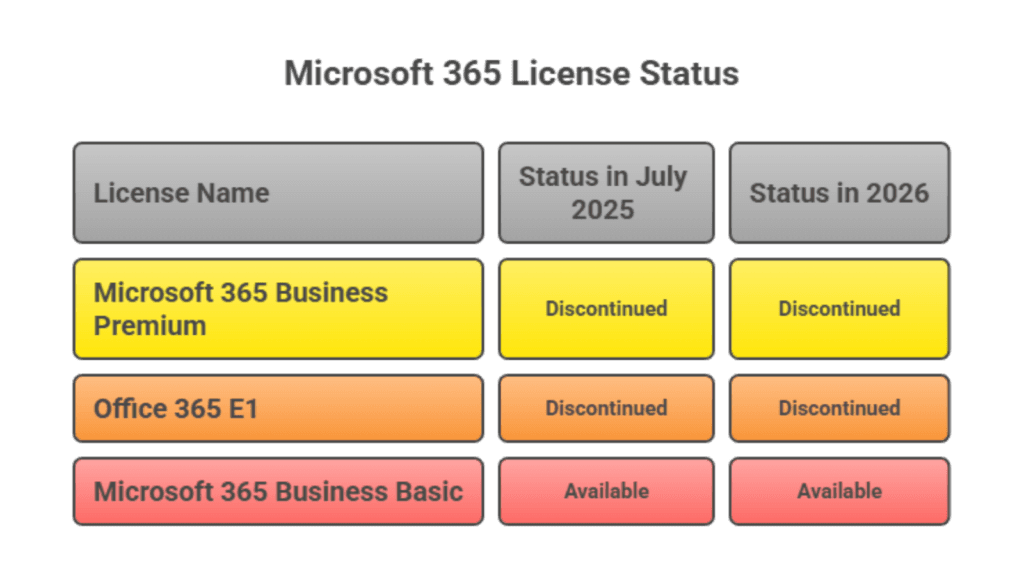
In May 2025, Microsoft pulled two of its most popular items off the nonprofit menu. Starting July 1, 2025, these donated licenses were discontinued:
Many small nonprofits had built their entire stack on these donated plans. The change forced a decision: pay for the discounted (not free) version, switch to a smaller donated plan, or move to a different productivity suite.
What’s still available through TechSoup in 2026:
The transition path most affected nonprofits chose: downgrade to Business Basic donated (free) for staff who only need email + web apps, then pay the discounted Business Standard or Premium for staff who need installed desktop apps and advanced security.
One ongoing rule worth knowing: Microsoft requires that at least 85% of assigned donated licenses be actively used. Underused donated licenses can be reclaimed. The Microsoft Admin Center shows usage reports — assign quarterly review of this to whoever owns IT, or you can quietly lose your free licenses.
A few things that don’t show up on the TechSoup help pages but save real time:
Verification stalls when nonprofits scramble to find this document mid-application. If you can’t find yours, request a copy via IRS Form 4506-A.
Browsing the catalog before validation is fine, but the real “go” decision belongs to validated organizations — what looks available may not be once eligibility is checked at checkout.
Vendor offerings change. Two recent examples: Adobe Acrobat Pro is no longer sold through TechSoup — instead, Adobe launched a direct nonprofit offer in November 2024 at $15/year per license (capped at 10 licenses per organization). And Adobe Creative Cloud for Education (Teams) is being discontinued after March 2026, replaced by Creative Cloud Pro for Teams at a new price point. Set a January calendar reminder.
Microsoft’s 85% utilization rule plus the general principle that “donated does not mean abandoned” — vendors do reclaim underused licenses.
A typical small nonprofit using TechSoup spends $200–500/year across all admin fees combined. Add this to your IT budget category — don’t surprise yourself at year-end. See our companion piece on running a lean nonprofit on AI tools for related budget-line thinking.
For most $250K–$2M nonprofits we work with, the TechSoup IT-budget question is one piece of a bigger picture: how does software spending sit alongside payroll, occupancy, fundraising, and program costs in your overall financial position?
When we do bookkeeping or 990 prep, we routinely see organizations either over-spending on software (paying retail when TechSoup or direct nonprofit pricing exists) or under-utilizing donated licenses they’re paying admin fees on. Both show up in functional expense allocation and can affect what your board sees on monthly financials. (For the broader picture on stewardship infrastructure, see our piece on why small nonprofits lose 80% of first-time donors.)
You can read more about our team and approach or browse the rest of our blog for nonprofit accounting and operations guides.
TechSoup isn’t the only guest list nonprofits qualify for. Google, Microsoft, and a handful of others run their own doors — sometimes with no cover charge at all. In the next post in this series, we’ll cover when to skip TechSoup entirely and walk in directly.
Want a CPA’s eye on your full nonprofit financial setup?
Reviewed by Min Kim, CPA. Get a free 30-minute review — we’ll walk through bookkeeping, 990 prep, and where IT and software spend fit your overall position.
Coming next in this series:
Common questions from small-team executive directors and bookkeepers shopping TechSoup for the first time.
TechSoup membership and registration are free. Each product purchase carries a small admin fee — typically $5 to $125 depending on the product — that supports TechSoup’s operations. So while it’s not technically “free,” the admin fees are usually a fraction of the discount you receive.
On average, about two business days from the time you upload your IRS 501(c)(3) Determination Letter. Some applications take longer if documentation is incomplete or your organization type requires additional review.
Yes, but only the Microsoft 365 Business Basic plan is still available as a donation — up to 300 licenses per qualifying organization. The previously donated Business Premium and Office 365 E1 plans were discontinued July 1, 2025. The discounted (paid) versions of Premium, Standard, and E1 are still offered.
Through TechSoup. QuickBooks Online Plus is $80/year via TechSoup (5 users) versus $1,680/year at retail — roughly 95% off. QuickBooks Online Advanced is $170/year via TechSoup (25 users) versus $4,080/year retail. Direct Intuit nonprofit programs exist but typically cap at smaller percentages, making TechSoup the better path for most small nonprofits.
The admin fee is real cash, not refundable, and it can erode the value on small single-user SaaS purchases where the discount is modest. The simple test: calculate one full year of total cost (admin fee + any vendor charge), then compare to the cheapest direct nonprofit alternative. If savings are under 30%, the convenience may not be worth the admin fee.