
Key Takeaways
Most small nonprofits don’t have a marketing team. The executive director writes the social posts, drafts the donor emails, edits the monthly newsletter, and somehow finds time for the actual mission. AI for nonprofit marketing isn’t a luxury for these organizations — it’s the difference between consistent communications and going dark for three weeks at a time. This guide is built for that reality, drawing on our team’s collective 23+ years of nonprofit operations work.
We’ll cover where AI saves the most time, which free tools are actually usable in 2026, prompts you can copy into ChatGPT or Claude this afternoon, what to never put into a public AI tool, and a one-hour weekly workflow that produces a full week of marketing content. We’ll also walk through ConnectNPO Content AI — a free tool our sister company built specifically for small nonprofits — for organizations that prefer a purpose-built interface over open-ended chat prompts.
The math on AI for nonprofit marketing is straightforward. According to a Federal Reserve Bank of St. Louis survey, knowledge workers using generative AI report saving an average of about 5.4% of their work hours — roughly 2.2 hours per week. Frequent users in a 2025 ITIF analysis reported much higher gains, with one in five saving 4 or more hours per week. For an executive director already wearing six hats, those hours go directly back into mission delivery.
The reason AI is a particularly strong fit for small nonprofit teams comes down to three structural realities:
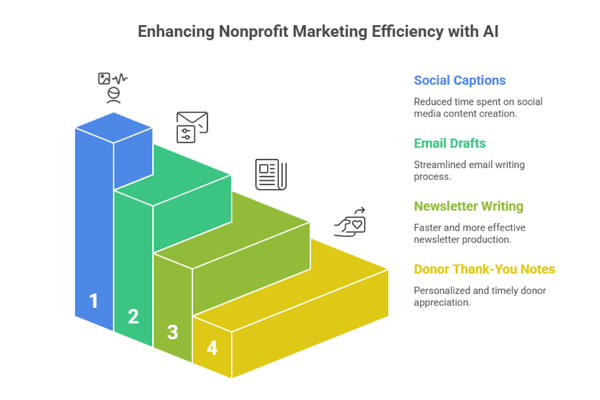
Not every marketing task gets equal lift from AI. Based on a wide range of OECD-cataloged experimental studies, AI productivity gains range from 15% to over 50% on writing-heavy tasks, with the largest benefits going to less-experienced workers. For a nonprofit ED, the four highest-leverage tasks are listed below — the per-task hour estimates reflect what our team typically observes at small nonprofits, not figures from the cited studies:
~2 hrs/week saved
Draft 5–10 captions per week from a few program updates. AI handles tone, hashtags, length variants for Facebook, Instagram, and X.
~1.5 hrs/week saved
Personalize 10–30 thank-you emails from a base template plus donor-specific notes. AI varies phrasing without sounding canned.
~3 hrs/month saved
Convert program updates and event recaps into a structured newsletter. AI drafts intros, transitions, and CTAs; ED edits and approves.
~1 hr/campaign saved
First drafts of email appeals, event invitations, and follow-up sequences. Keep the strategy human; let AI handle the wording.
Notice what’s not on this list: strategy, donor relationship management, board communication, sensitive funder conversations. AI helps with execution, not judgment. The hours saved on execution are exactly the hours that should go back into the relationship work AI can’t do.
For a nonprofit on a tight budget, four free tiers cover roughly 90% of marketing content needs in 2026. Pricing reflects publicly listed limits as of April 2026 and changes regularly — verify current limits before committing to a single tool.
Practical guidance: pick one chat tool (ChatGPT or Claude) and stick with it for two weeks before adding a second. The productivity gain comes from learning how that one tool responds to your prompts, not from chasing the latest model release. Canva for Nonprofits is a separate decision — if your org qualifies, the verification effort pays back in the first week.
Effective AI for nonprofit marketing comes from good prompts, not better tools. A good prompt provides four things: audience, tone, length, and call-to-action. Here are five prompts you can copy directly — replace the bracketed sections with your specifics.
Prompt 01 · Donor Thank-You Email
When you receive a donation and want a personal-feeling thank-you in 60 seconds.
Write a warm, sincere thank-you email to [Donor First Name] for a [$Amount] gift to support our [Program Name]. Keep it under 120 words. Reference the specific impact: [1 sentence about what the gift funds]. Sign as [Your Name], [Your Title]. Tone: grateful and personal, not corporate. Avoid “deeply” and “humbled.”
Prompt 02 · Social Media Carousel
Convert one program update into a week of social posts.
I run a small nonprofit focused on [Mission]. Here’s a recent program update: [3-5 sentences]. Generate 5 social media captions: 1 for Facebook (under 80 words, conversational), 1 for Instagram (under 60 words plus 5-7 hashtags), 1 for X (under 280 chars), and 2 LinkedIn variants (one shorter, one with a personal angle, both under 100 words). Tone: hopeful, specific, no jargon.
Prompt 03 · Monthly Newsletter Outline
Turn a few bullet points into a structured newsletter draft.
Write a monthly nonprofit newsletter for [Organization Name], a [501(c)(3) focused on mission]. This month’s content: 1) [Program update]. 2) [Upcoming event with date]. 3) [Volunteer or donor spotlight]. 4) [Specific ask]. Structure with 4 short sections (under 90 words each), a clear subject line under 50 chars, and a closing CTA to [Action]. Tone: warm, direct, no clichés.
Prompt 04 · Event Announcement
Drafts an event email and matching social posts in one shot.
We’re hosting [Event Name] on [Date] at [Location], focused on [Purpose]. Tickets/RSVP at [URL]. Audience: [Who should come]. Generate: 1) An invitation email under 200 words with a clear what/when/where/why and CTA. 2) A Facebook event description under 100 words. 3) A 1-week-out reminder email under 100 words. Tone: enthusiastic but specific.
Prompt 05 · Year-End Appeal
Year-end fundraising email built around one beneficiary story.
Draft a year-end appeal email for our nonprofit serving [Population]. Open with this anonymized scenario: [3-4 sentence story, names changed]. Tie to our mission. State the specific need: [$Goal Amount] to fund [What it funds]. CTA: donate at [URL]. Length: 250-350 words. Tone: urgent but not panicked. Avoid “transformative” and “unprecedented.” Sign as [Name, Title].
Save these prompts in a Google Doc or notes app and refine them as you learn what works. The first version of any prompt is rarely the best version — you’ll find phrasing that consistently gets you the right tone, and you’ll start dropping unhelpful constraints (the “avoid ‘deeply’” trick is one of ours).
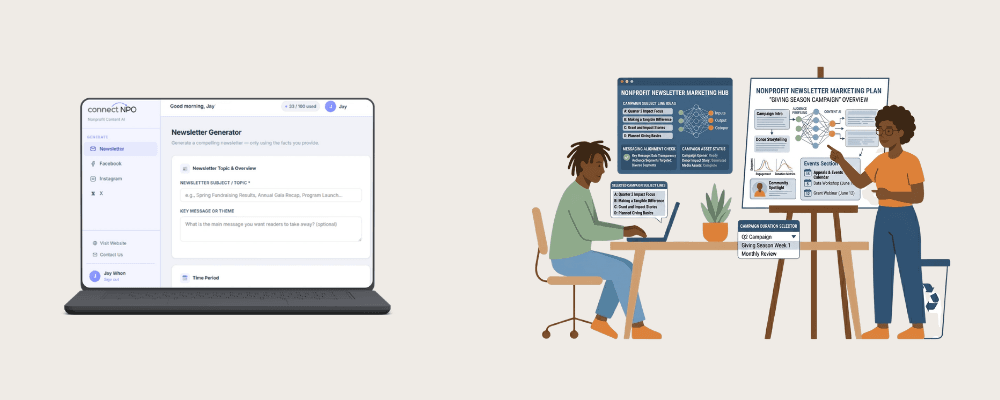
Disclosure: our team also operates ConnectNPO Content AI, which is the sister marketing arm of GivingArc. We built it for the nonprofits who tell us they don’t want to learn prompt engineering — they just want a tool where they fill in a few fields and get back something usable. It runs on Anthropic’s Claude API behind the scenes, so the underlying model quality is the same as Claude’s direct interface.
Four content types, each with its own form:
The free tier is 100 generations per month. That’s enough for a small nonprofit running 2–3 social posts/week across platforms plus a monthly newsletter, with headroom for event campaigns. No credit card required to sign up. The trade-off versus open ChatGPT or Claude is freedom — you can’t go off-script and ask the tool to draft a board meeting agenda, for example. For everyday marketing content, that’s usually a feature, not a bug.
Try ConnectNPO Content AI free — 100 generations/month
Newsletter, Facebook, Instagram, and X content built for small nonprofits. No credit card.
AI is a useful drafting partner. It’s not a system of record, a security boundary, or a substitute for human judgment. The mistakes that hurt nonprofits aren’t about producing slightly awkward sentences — they’re about pasting the wrong things into the wrong window.
Public AI tools may use chat content to train future models unless you’ve opted into a paid enterprise tier with documented data-handling provisions. Use anonymized scenarios for examples (“a $250 donor in California…”).
Anonymized aggregate numbers (“our program expense ratio is 78%”) are fine. Specific donor amounts, employee compensation, restricted-fund balances, or anything that would appear on Form 990 Schedule B should never go into a public AI tool.
AI hallucinates statistics, miscites laws, and occasionally invents nonprofits that don’t exist. Read every word before it goes out under your organization’s name. Misstating a fact about your own programs is the kind of error donors notice.
One useful framing: treat ChatGPT or Claude like an enthusiastic intern who is great at drafting but doesn’t know your organization. You give them safe, generic context, they produce a draft, you review and edit before anything goes out. That mental model handles 95% of the risk.
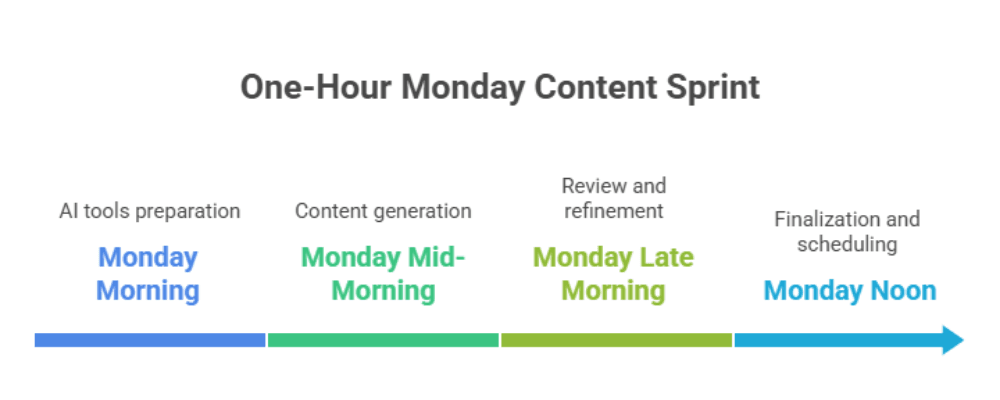
The most useful AI for nonprofit marketing implementations we’ve seen aren’t about the tool — they’re about the workflow. Here’s a one-hour Monday sprint that produces an entire week of marketing content.
Open a notes app and type 6–10 bullet points of what happened this week (program updates, new donors, volunteer wins, upcoming events). Don’t edit. Just dump.
Paste those bullets into Prompt 02 (above) or ConnectNPO Content AI. Get back 5–7 captions across Facebook, Instagram, and X. Edit lightly — usually 1–2 words per caption.
Run Prompt 01 once per recent donor. Personalize the program-impact sentence manually. AI handles tone variation so 10 emails don’t read like the same template.
Drop social captions into your scheduler (free options: Buffer, Meta Business Suite). Schedule the donor emails to send mid-morning Tuesday and Thursday for highest open rates.
Read every scheduled post and email one final time. Catch any awkward phrasing, hallucinated facts, or off-mission claims. Adjust and confirm. Done for the week.
One hour on Monday produces 5–7 social posts, 5–10 personalized donor emails, and a clean schedule across the week. The remaining 39 hours of your week go where they should — into program work, fundraising relationships, and board engagement that AI can’t do.
GivingArc handles the financial side of small and mid-sized nonprofits — monthly bookkeeping, Form 990 preparation, audit readiness, and outsourced finance. Our sister company ConnectNPO handles the marketing side. The two together cover the operational gaps small nonprofits commonly hit: too little time for finance compliance, too little time for consistent marketing, and not enough headcount to hire specialists for either.
If you’re already weighing whether to outsource your nonprofit accounting, AI on the marketing side can free up enough ED time to make those structural conversations possible. For a free consultation on the financial side, reach out here. For broader background on running a financially healthy nonprofit, see our bookkeeping best practices guide, our nonprofit fund accounting basics, and our short nonprofit financial health checklist. You can also learn more about our team and how we work with nonprofits nationwide.
Ready to simplify your nonprofit accounting?
Get a free custom quote tailored to your organization — no obligation.
Common questions from small-team executive directors using AI tools every week.
Yes, with reasonable boundaries. Public AI tools are safe for drafting captions, emails, and newsletter copy from generic prompts and anonymized scenarios. They’re not safe for pasting in donor records, financial detail, beneficiary information, or board PII because public-tier inputs may be used to improve future models. If you need to work with sensitive data, use the paid enterprise tiers (ChatGPT Enterprise, Claude for Work, Gemini Workspace) that contractually exclude inputs from training, or anonymize the data before pasting.
There’s no general legal requirement to disclose AI assistance in routine marketing copy (newsletters, captions, donor emails) in the US as of 2026. Most nonprofits don’t disclose, just as they don’t typically disclose that staff used spell-check or a template. There’s an important carve-out, though: FTC guidance treats AI-generated endorsements, testimonials, and beneficiary personas that could mislead a reasonable reader as a separate category requiring clear-and-conspicuous disclosure or outright prohibition. Practical rule: AI assistance for marketing copy is fine without disclosure; AI-fabricated quotes from real or imagined donors and beneficiaries is not. Stay accurate; the medium is secondary.
No — Google penalizes low-quality content produced at scale, regardless of whether a human or an AI wrote it. The framework is E-E-A-T (Experience, Expertise, Authoritativeness, Trustworthiness). AI-assisted content that demonstrates real organizational expertise, includes human review and editing, and serves user intent ranks the same as human-written content. What gets penalized is mass-produced thin content with no editorial value, which was a problem before AI existed.
For raw flexibility, ChatGPT Free or Claude Free both handle social caption generation well — pick the one whose conversational style fits your voice. For nonprofits that don’t want to learn prompt engineering, ConnectNPO Content AI (full disclosure: built by our team) provides Facebook, Instagram, and X generators tailored for nonprofit content with 100 free generations per month. For visual content, Canva for Nonprofits offers free Canva Pro to verified 501(c)(3) organizations, including AI-powered Magic Write and Magic Design.
Not really — AI is best at execution, not strategy. A marketing volunteer or consultant who knows your mission, audience, and brand voice still adds value AI can’t replace: campaign planning, donor segmentation, message testing, photography, and the human judgment that makes one campaign land and another fall flat. What AI can do is multiply your existing person’s output by 2–3x. If your consultant currently has time for one campaign per quarter, with AI assistance they can usually deliver one campaign per month at the same hourly cost.